Extending Mobile Navbar
Mobile navbar is an interface element, which allows your customers to navigate between the upper-level sections of your store. A mobile navbar is displayed in the lower part of the screen.
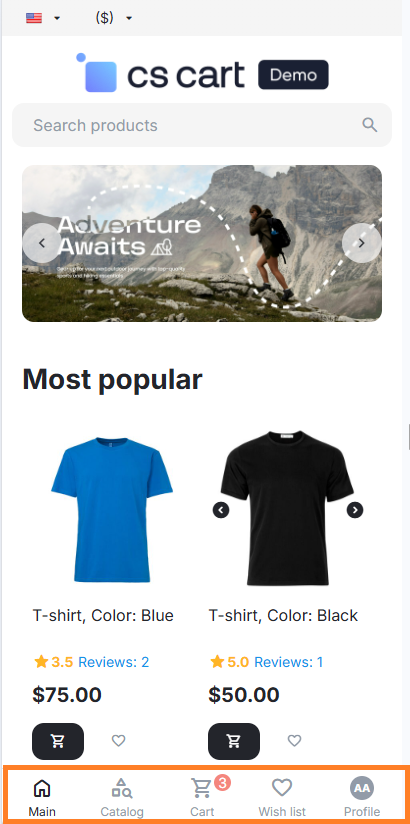
The similar interface element in mobile applications is usually called Tab Bars.
Note
Mobile navbar is displayed only in Nova theme.
Best Practices
- Use the mobile navbar to support navigation, not to provide any actions. A mobile navbar allows your customers to navigate between various sections of your store, such as Main, Catalog, Cart, Wishlist and Profile.
- Do not add a new section unless it is absolutely necessary. Use the mobile navbar to show only those sections which are often visited by your customers. Note that it is easier to navigate between a less number of sections. We recommend showing 5 or 6 sections. If a new section is rarely visited, you should specify the link to it in one of the existing sections or in the Quick Links block.
- Use a short name for the section header. A good header clearly describes the type of the content or the functionality of the section and thus makes navigation easier. Use a header of max. 9 symbols to avoid possible truncation of the text on small screens.
- Consider using standard icons of the theme. This provides visual compliance of the icons on the mobile navbar.
- Use a badge for a non-intrusive message that information is available. You can display a badge, a red oval with a white text or a number in it, or an exclamation mark on the section to emphasize that the section contains new or updated information, which may draw customer’s attention.
- Use highlighting to emphasize that the section is active. It may help your customers to understand which section they are in.
Standard Sections
- Main;
- Catalog;
- Cart;
- Wishlist. It is shown only if the Wish List add-on is activated;
- Profile.
Adding a New Section
Use an add-on to add a new section to the mobile navbar. To add a new section, connect to the hook in the index:navbar_mobile template. For example, create the file design/themes/nova_theme/templates/addons/YOUR_ADDON/hooks/index/navbar_mobile.post.tpl with the following content:
{strip}
{$navbar_mobile_items = array_merge($navbar_mobile_items, [
    my_changes => [
        id => "my_changes",
        insert_before_id => "account",
        container_id => "account_info_navbar_mobile_my_changes",
        href => "my_changes.view",
        controllers => ["my_changes"],
        badge => $my_changes_navbar_mobile_badge,
        icon => "ty-icon-heart",
        custom_icon => "html source",
        text => __("my_changes.navbar_mobile.text")
    ]

])}
{* Example of a dynamic icon *}
    {if true}
        {capture name="my_changes_custom_icon" assign="my_changes_custom_icon"}
            <span class="ty-navbar-mobile__item-profile-icon">
                HI
            </span>
        {/capture}
        {$navbar_mobile_items.my_changes.custom_icon = $my_changes_custom_icon}
    {/if}

{* Export *}
{$navbar_mobile_items = $navbar_mobile_items scope=parent}
{/strip}
where:
id(string)—ID of the element (not used for html-attributeid);insert_before_id/insert_after_id—insert before / after the element with the specified ID. The following elements are available by default: homepage, menu, cart, account. The wish list element is available only if the Wish List add-on is activated;container_id(string)—(optional) ID of the html-attributeidof the container. It is useful in Ajax requests in casebadgeis updated;href(string)—link to the page;controllers(string)—a list of controllers, with which the section is active;badge(string)—(optional) a number or a text of the section badge;icon(string)—an icon of the following typety-icon-xxx. See the list of all icons in CSS stylesdesign/themes/nova_theme/css/tygh/icons.less.custom_icon(string)—(optional) a custom html instead oficon. If specified,iconis ignored. For example, it is used to display the avatar of an authorized user.text(string)—a text of the section name; max. 9 symbols.
Hint
Example: The Wish List addon, which adds a new section before the Profile section. Template: design/themes/nova_theme/templates/addons/wishlist/hooks/index/navbar_mobile.post.tpl:
{strip}
{$wishlist_count = ""|fn_wishlist_get_count scope=parent}

{$navbar_mobile_items = array_merge($navbar_mobile_items, [
    wishlist => [
        id => "wishlist",
        insert_before_id => "account",
        container_id => "account_info_navbar_mobile_wishlist",
        href => "wishlist.view",
        controllers => ["wishlist"],
        badge => (($wishlist_count > 0) ? $wishlist_count : ""),
        icon => "ty-icon-heart",
        text => __("wishlist.navbar_mobile.text")
    ]
])}

{* Export *}
{$navbar_mobile_items = $navbar_mobile_items scope=parent}
{/strip}
Questions & Feedback
Have any questions that weren't answered here? Need help with solving a problem in your online store? Want to report a bug in our software? Find out how to contact us.