Clearing the Cache
Cache in CS-Cart is almost identical to cache in any other application; it works in a similar way.
Cache data is a part of previously processed data, which is stored in a separate location (directory) for quick access. You can further use this data directly instead of spending time on recalculating it.
You may want to clear cache in these two cases:
- the cache is obsolete, and the saved files do not match the files on the web server;
- the cache takes too much space on the hard drive.
To clear the cache, go to Admin panel, then press Settings → Clear cache:
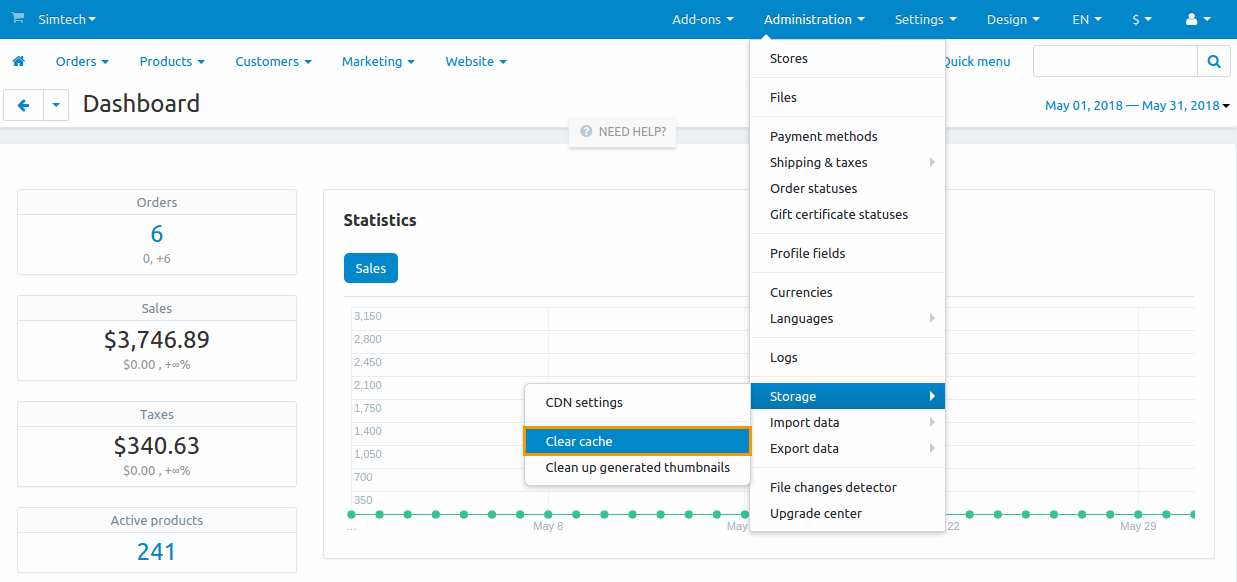
In this case, the files of the following directories will be removed:
- var/cache/misc—static cache (css/js) and other cached data;
- var/cache/registry—Registry cache (configuration data, frequently used values, add-on settings etc.);
- the cscart_cache_handlers table—relations between registered cache records and tables they depend on;
- var/cache/templates—template cache.
Selective cache clearing
You can clear specific parts of the cache (not the whole cache) using the following parameters in URL to the script in the Admin panel:
- ct—to clear icons;
- cc—to clear cache; in this case, the following files are deleted:
- var/cache/misc files;
- var/cache/registry files;
- cscart_cache_handlers table;
- ctpl—to clear template cache; the files of the var/cache/templates folder will be deleted.
These parameters can be combined and/or used together at once.
Manual cache clearing
To clear cache manually, delete the var/cache directory of your store
Hint
If deleting this directory takes too much time, you can simply rename it, and delete it later, when you have more available resources. The result will be the same as if you deleted this directory.
CS-Cart stores cache not only in files; there are such types of storing cache as: file, sqlite, database, redis, xcache, apc, apcu. The corresponding parameters are set in the file config.local.php:
$config['cache_backend'] = 'file'
Thus, when clearing cache in the var/cache/registry folder, configuration data, frequently used values, add-on settings etc. will be removed only if the file parameter is set in this file. Otherwise, cache is cleared in the storage, which is currently used to store the cache.
If you are using non-file cache, try to clear cache in the Admin panel. If this does not work and you are not storing the cache in a database, try restarting the service used for the cache storage backend. If this still does not work, please contact your server administrator and/or switch to using a different cache backend.
Questions & Feedback
Have any questions that weren't answered here? Need help with solving a problem in your online store? Want to report a bug in our software? Find out how to contact us.