How To: Filter Products by Free Shipping
In the Administration panel, go to Products → Filters.
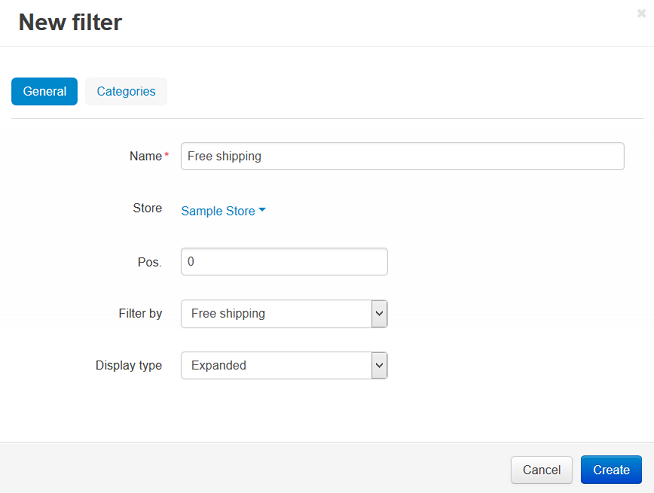
Click the + button on the right and specify the following fields in the New filter window that will open:
- Name—for example, Free shipping.
- Store—the storefront to which the filter will belong.
- Pos.—the desired position of the filter relative to other filters.
- Filter by—Free shipping.
- Display type—the way how the filter will be displayed.
Switch to the Categories tab.
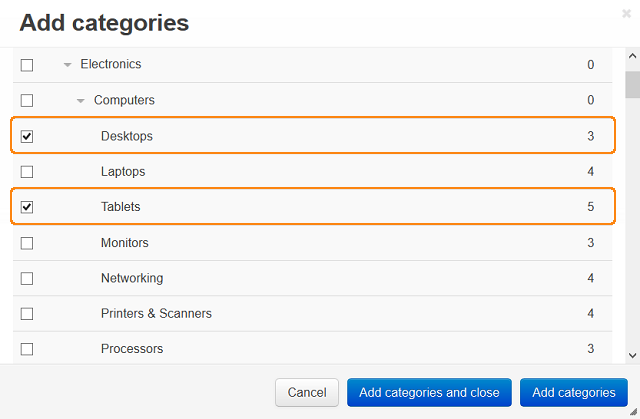
Click the Add categories button and add categories where this filter will be displayed.
Click the Create button.
Questions & Feedback
Have any questions that weren't answered here? Need help with solving a problem in your online store? Want to report a bug in our software? Find out how to contact us.