How To: Customize Mobile-Specific Elements of Nova Theme
Nova theme is optimized for mobile devices. If you use Nova theme and if you open your site on a mobile device, you will see some custom elements. The storefront will have a bottom navigation bar, as if you were using a mobile application:
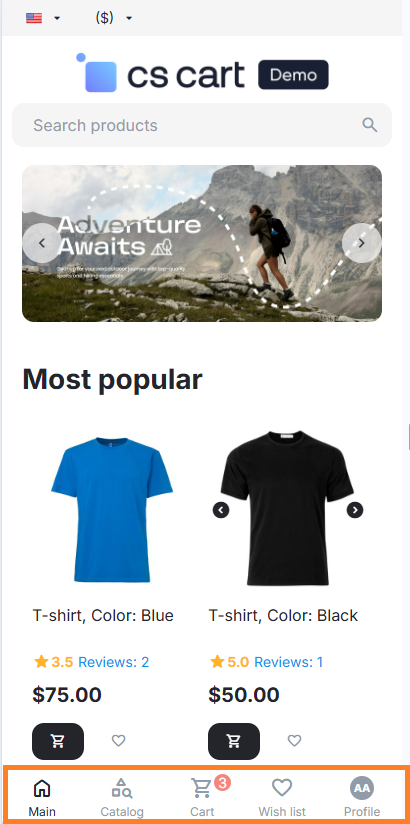
The top bar will also look different; it will not have a logo, just the essential elements will appear. Due to this, your store with Nova Theme looks more familiar and convenient to customers as if they opened a mobile application.
To do this, we had to limit some options allowing to configure mobile view. But in CS-Cart you can still configure these mobile-specific elements or remove them at all.
How to Change the Appearance of the Header and the Footer in the Mobile Version
The header and the footer of your website include the following elements:
- Top panel: Languages, Currencies, Quick links, My Account (
top-panel-grid-display) - Header: Logo (
top-logo-grid-display), Search, Call Request, Cart content, Main menu (header-grid-display) - Footer: Subscribe, Social links, Footer menu, Copyright, Payment icons (
footer-grid-display)
How to Show or Hide Top Panel/Header/Footer/Logo in the Mobile Version
To do this, add the following CSS styles to Custom CSS or to My Changes addon:
/* Hide grids on mobile */
:root {
    /* Main menu controller */
    --ty-menus-top-panel-grid-display: none;
    --ty-menus-header-grid-display: block;
    --ty-menus-footer-grid-display: none;
    --ty-menus-top-logo-grid-display: none;

    /* Products controller */
    --ty-products-top-panel-grid-display: none;
    --ty-products-header-grid-display: none;
    --ty-products-footer-grid-display: block;
    --ty-products-top-logo-grid-display: block;

    /* Categories controller */
    --ty-categories-top-panel-grid-display: none;
    --ty-categories-footer-grid-display: block;
    --ty-categories-top-logo-grid-display: none;

    /* Checkout controller */
    --ty-checkout-top-panel-grid-display: block;
    --ty-checkout-header-grid-display: none;
    --ty-checkout-footer-grid-display: block;
    --ty-checkout-top-logo-grid-display: none;

    /* Profiles controller */
    --ty-profiles-top-panel-grid-display: block;
    --ty-profiles-header-grid-display: none;
    --ty-profiles-footer-grid-display: block;
    --ty-profiles-top-logo-grid-display: block;
}
where:
/* XXX controller */—a section with styles for the specified controller (a set of pages of the same type);--ty-YOUR_CONTROLLER-YOUR_GRID-grid-display: YOUR_DISPLAY;—setting a style variable for the specified controller (YOUR_CONTROLLER), block (container/grid,YOUR_GRID) with the specified display (YOUR_DISPLAY);- instead of
YOUR_CONTROLLER, specify the following controller:menus,products,categories,checkoutorprofiles; - instead of
YOUR_GRID, specify the container of the grid from the block manager:top-panel,header,footer,top-logo; - instead of
YOUR_DISPLAY, specifyblockto show, or specifynoneto hide the block.
You can specify only modified values. For example, the header is not shown on the details page, and you see the following:
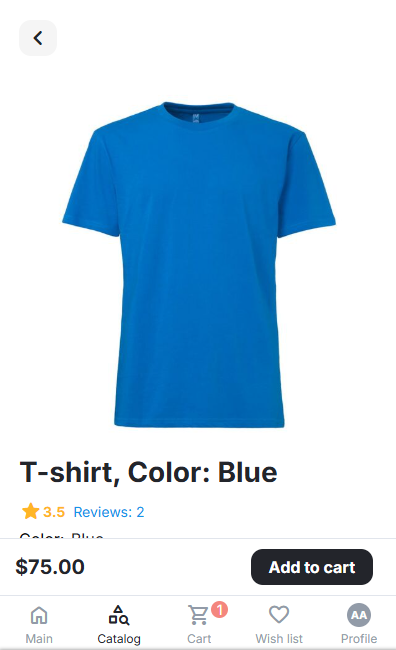
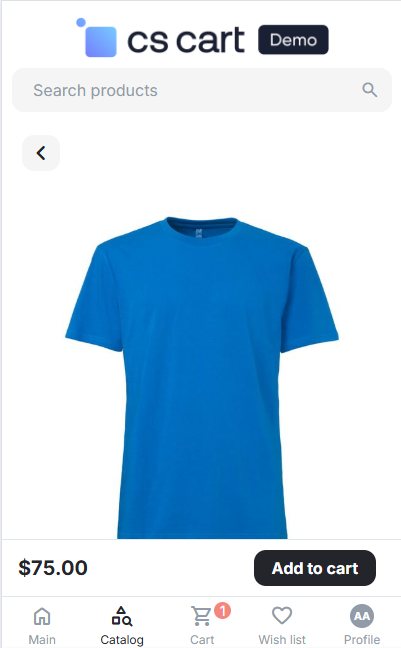
To show the header on the details page (including the search and the logo), you can add the following Custom CSS:
/* Hide grids on mobile */
:root {
    /* Products controller */
    --ty-products-header-grid-display: block;
}
and see the following:
Note
The logo grid is located inside the header container. To show the logo, configure the header display first.
How to Enable the Display of Every Block on a Mobile Device / How to Disable the Display Change on a Mobile Device
To disable the mechanism of mobile-friendly header and footer, remove the following User-defined CSS class for the corresponding container/grid:
- Location Default: Top panel container: remove
ty-top-panel-grid-responsive. - Location Default: Header container: remove
ty-header-grid-responsive. - Location Default: Logo grid: remove
ty-top-logo-grid-responsive. - Location Default: Footer container: remove
ty-footer-grid-responsive. - Location Checkout: Logo grid: remove
ty-top-logo-grid-responsive.
Hint
It is easier to rename CSS classes instead of removing them; e.g., ty-top-panel-grid-responsive → ty-top-panel-grid-responsive_DELETE. It allows temporary disabling of the styles, which are no longer required, and if necessary, to restore them by reverse renaming.
Questions & Feedback
Have any questions that weren't answered here? Need help with solving a problem in your online store? Want to report a bug in our software? Find out how to contact us.