Interaction between Features (and Groups of Features) and Categories of Products
CS-Cart allows assigning product features (and feature groups) to categories. This approach has the following advantages:
- Simple catalog management. When creating or editing a product, administrators only configure the features relevant to the product’s category. For example, a product in the “Apparel” category might have features like “Size” and “Color”, but will not have the “Power consumption” feature (which belongs to the “Electronics” category).
- Catalog consistency. If a product is moved to another category, irrelevant features are removed automatically. This reduces the risk of human error.
- Improved search and filtering. Feature-based filters appear only in the categories where they are relevant.
This approach requires special attention because product features can be removed in the following cases:
- if a product is moved to another category, where features from the previous category are not available;
- if a feature is removed from the product’s current category. In this case, features that are not assigned to any category are removed as they are no longer relevant.
Protection against Unintentional Removal of Product Features (Groups of Features)
Important
Starting with version 4.20.1, CS-Cart displays a warning when a product feature may be removed and suggests how to prevent it.
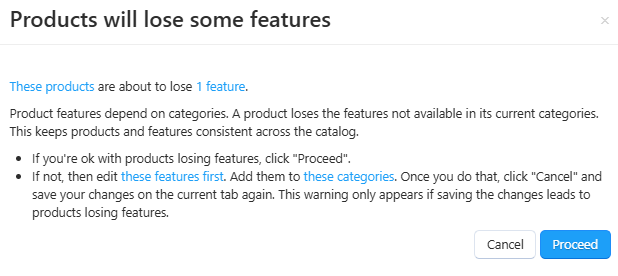
If you see a warning about feature removal, you can:
- confirm the feature removal;
- cancel the feature removal; in this case, you follow these steps:
- click the Cancel button; do not close the current tab;
- in a new tab:
- edit the features (feature groups);
- assign these features to the required categories or assign them to other categories.
- return to the previous tab and try saving your changes again.
Examples
Changing a product category
The product “Running Shoes”, belonging to the “Sports Goods” category, has the following features:
- color;
- size;
- material;
- sports discipline.
Task: move the “Running Shoes” product to the “Apparel” category, where the products have the following features:
- color;
- size;
- material.
Problem: when moving the product to a new category, the product loses the “sports discipline” feature. The system will display a corresponding warning.
Solutions:
- cancel moving the product to a new category and add the “sports discipline” feature to the “Apparel” category; the feature will be preserved;
- confirm the removal of the “sports discipline” feature, as the product name already indicates that the shoes are designed for running;
- cancel moving the product to a new category and keep the product assigned to both categories.
Changing a product feature
In your store, you decided to offer customers packaging options: standard, gift, or no packaging. For this purpose, a feature called “Packaging” was created and assigned to all products. Over time, for some products in the “Computers” category, specifically for monitors, this feature is considered unnecessary: gift packaging is not a practical solution for large monitors.
Task: remove the “Packaging” feature for the “Monitors” product category.
Problem: this feature will be removed from all products in this category, regardless of their size. The system will display a warning indicating which products will have this feature removed.
Solutions:
- confirm the removal of the “Packaging” feature; later you can create a separate feature for small-sized monitors;
- cancel the feature removal.
Questions & Feedback
Have any questions that weren't answered here? Need help with solving a problem in your online store? Want to report a bug in our software? Find out how to contact us.